






Many e-commerce owners want to run Google Ads but feel overwhelmed by setup, bidding, product feeds, and what to expect from their first campaigns.
This beginner-friendly guide explains how Google Ads works for online stores, how to structure your campaigns, and how to build a foundation that leads to profitable results.
Key takeaways:
- Learn the core Google Ads formats used by successful online stores.
- Understand real performance benchmarks for Search, Shopping, and Performance Max.
Set up tracking, product feed, and campaign structure the right way. - Follow proven steps to optimize, scale, and avoid common mistakes.
Why Google Ads Matters for E-Commerce Growth
Google Ads offers unmatched buying intent. When shoppers search for products, they reveal exactly what they want, allowing online stores to capture demand at the perfect moment.
Reports show that Google Ads helps online stores reach high-intent customers faster than most paid channels. It also gives advertisers complete visibility into performance metrics, enabling them to refine campaigns over time.
What Good Performance Looks Like for Beginners
Beginners often wonder whether their numbers are “normal.” Benchmark studies help set realistic expectations.
- The average conversion rate for e-commerce Search campaigns is roughly 2.8%
- General Google Ads conversion rates across industries average around 7.5%
- Shopping ads convert around 1.9% on average
- The typical CPA for e-commerce Search generally ranges from $45 to $100, though it can vary widely based on several factors.
If early campaigns land near these ranges, performance is within a normal beginner baseline. Improvement comes from optimization, data, and better product feed quality.
The Foundation: What Every Beginner Must Set Up First
Before spending any budget, get your technical base right. Poor tracking or a weak product feed leads to wasted spend.
Build tracking and measurement
Install GA4, set up conversions, enable enhanced measurement, and connect Google Ads with Analytics. Proper conversion tracking predicts campaign success more than any targeting or bidding setting.
Set up Merchant Center and your product feed
For Shopping campaigns, Google relies directly on your product data, especially accurate titles, clean images, correct pricing, and updated availability. Product feed health impacts visibility and cost.
Strengthen product pages and store UX
Even the best ads fail if the store loads slowly or lacks trust signals. If the store struggles with UX or conversion flow, a team like Impremis can help optimize landing pages and navigation to improve conversion rates before ad spend ramps up.
Choosing the Right Google Ads Campaign Types
Beginners should focus on the core formats that drive predictable returns for online stores.
Search Campaigns
Search ads put your products in front of shoppers actively typing in purchase-ready keywords. They’re essential for beginners because they provide predictable intent and clean data.
Shopping Campaigns
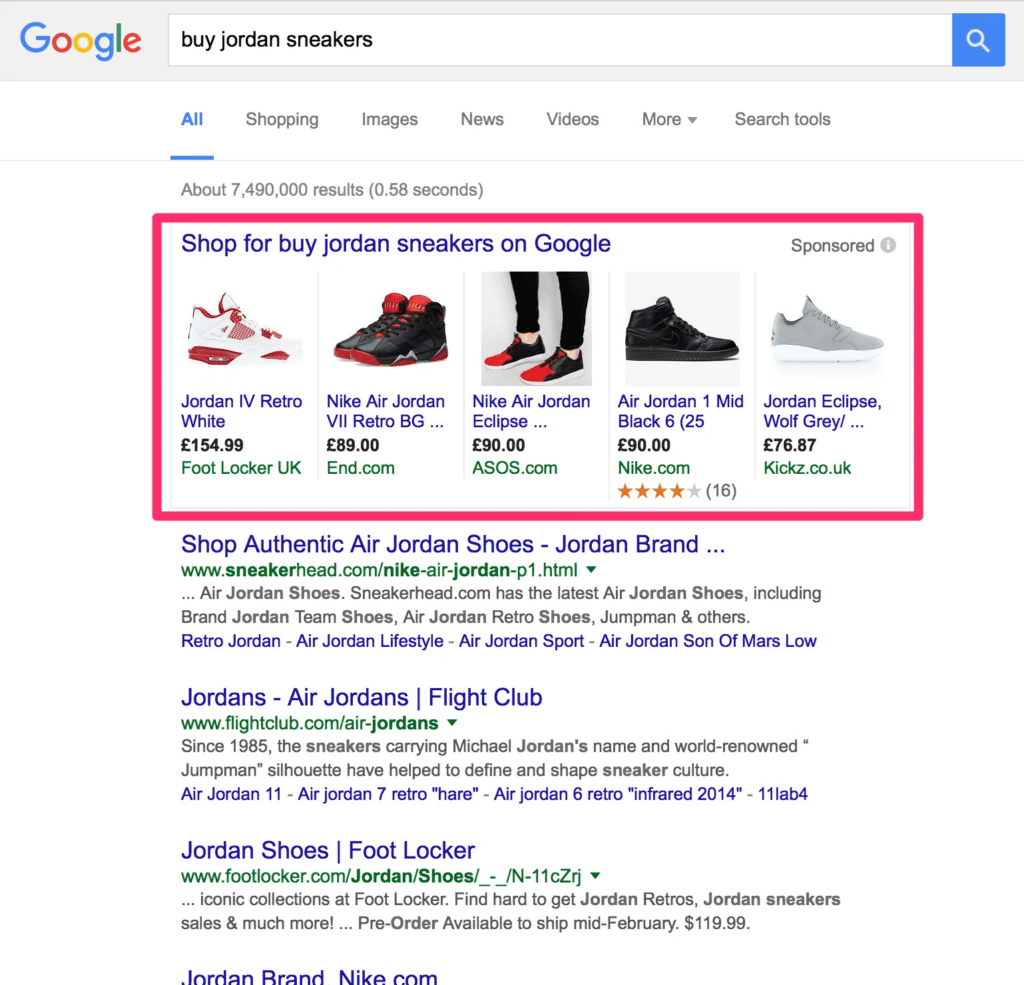
Shopping ads show product images, prices, and titles. Research shows that high-quality images and keyword-rich product titles increase click-through and conversion rates.
Performance Max
Once Search and Shopping produce stable results, add Performance Max. Performance Max works best when product feed quality is high and conversion tracking is fully accurate.
Beginner-Friendly Campaign Structure
Beginners often overspend by mixing too many products and keywords into one campaign. A simple structure works best.
For Search Campaigns
- One campaign for the core product category
- Tight ad groups with focused keyword themes
- Responsive search ads with multiple benefit-driven headlines
For Shopping Campaigns
- One Shopping campaign to start
- Segment products by margin or bestsellers later
- Ensure your feed titles include brand, product type, size, color, or features
For Performance Max
- Add once you have 30–60 days of conversion history
- Supply strong creatives and accurate product feed
- Use audience signals based on past customers or site visitors
If structuring campaigns feels overwhelming, Impremis can support setup and ongoing management through its performance marketing services.
Optimization Tips That Drive ROI
The strongest Google Ads results come from consistent, weekly improvements.
Improve product titles
Keywords in a product title dramatically influence Shopping visibility.
Monitor key metrics
Track metrics such as CTR, CPC, conversion rate, CPA, and ROAS. Compare your results against current industry benchmarks to spot opportunities.
Improve store UX
Slow load times and confusing layouts reduce conversions. Impremis helps brands improve user experience and conversion flow.
Scale slowly
Increase budgets only when performance stays consistent for at least two weeks. Avoid rapid scaling that distorts cost efficiency.
Frequently Asked Questions
What budget should a beginner expect to start with on Google Ads?
Most beginners see meaningful data at $30 to $50 per day across Search and Shopping.
Smaller budgets often produce slow learning. If budget allocation or structure feels unclear, Impremis can help create a scalable plan and optimize spend for stronger ROI.
How long until a new e-commerce Google Ads campaign becomes profitable?
Most stores need about 30 to 60 days of testing as Google learns what converts. Profitability depends on product pricing, margins, feed accuracy, and store UX.
Impremis helps brands shorten this ramp-up time by improving conversion paths and ad structure.
Why do Google Ads get clicks but no sales for online stores?
This usually means the product page or checkout process has friction. Examples include unclear value, slow load times, lack of trust badges, or weak descriptions.
Our team specializes in conversion rate optimization and web design improvements that turn ad traffic into sales.
Ready to Launch High-ROI Google Ads Campaigns?
If you want expert help with campaign setup, product feed optimization, or improving conversion rates, Impremis can support the entire process.
Explore capabilities on the Impremis website or connect with the team through the contact page to build a profitable e-commerce advertising strategy.