
Close Menu

Email is no longer a one-way broadcast. 

When brands treat it like a real conversation, using tone, timing, and content that respects each reader’s journey, engagement, conversions, and loyalty go up dramatically. 

This article shows why conversational email design works, how to use it, and how to build email flows that feel human and deliver results.

Key takeaways:

  • Conversational tone and natural flow in emails boost open rates, CTR, and conversion.
  • Combining behavioral triggers, content personalization, and NLP-inspired copy lifts engagement more than generic blasts.
  • A step-by-step framework makes it easy to implement conversational email design across automation and campaigns.

What Is Conversational Email Design, And Why It Matters

Conversational design borrows from “conversational marketing,” a method where brands speak to customers as if in a dialogue, using friendly tone, context, and timely messaging instead of generic broad-casts.

Applied to email, this means emails feel like a one-on-one note rather than a mass mailing. This approach helps build trust, relevance, and responsiveness. 

Research shows that personalized and behaviorally triggered emails, including conversational design elements, deliver much better results in open rates, click-through rates, and long-term customer engagement.

In short, conversational email design turns inboxes into real conversations, the kind of communication that converts.

How Conversational Design Impacts Engagement & Conversion

Conversational design influences key performance metrics through several levers:

  • Personalization + behavioral triggers: Emails tailored to user behavior or lifecycle stage (welcome series, abandoned cart, post-purchase, re-engagement) improve relevance and timeliness.
  • Tone and language that reads like a human wrote it: When emails adopt a natural, friendly tone rather than salesy or robotic language, readers respond better.
  • Dynamic and contextual content: Using content blocks that adapt to user data (preferences, past actions, segment) creates more relevance and reduces material that feels generic or spammy.
  • Responsive design + mobile friendliness + personalization hygiene: Clean design and proper email structure, along with respecting privacy and user consent, ensure deliverability, trust, and readability across devices.

Together, these elements make the email feel like a conversation tailored to the reader, which improves response and conversion.

What Conversational Email Design Looks Like in Practice

Here’s how a campaign built with conversational design might work:

  • Trigger-driven flows instead of mass blasts
    E.g. a user abandons their cart, they get a friendly, helpful note reminding them, acknowledging why they left, maybe offering a small nudge or reassurance.
  • Dynamic content based on user data
    E.g. showing product suggestions tied to past behavior, using first name or segment-based greetings, or adjusting tone depending on whether the subscriber is a first-time customer or a loyal buyer.
  • Conversational copywriting style
    Using short sentences, friendly tone, simple language, and direct calls to action, as if writing to a friend, not a mass audience.
  • Segmented, relevant messaging
    Dividing subscribers into small, meaningful groups, like new leads, active customers, dormant users, and tailoring content for each.
  • Automation + personalization at scale
    Email systems that use behavioral triggers, user data, and flexible templates to send relevant, timely, and individualized messages.

This approach blends strategy, empathy, and data, and treats each subscriber as a person, not a batch number.

A Framework: 5 Steps to Build High-Performing Conversational Emails

StepWhat to DoWhy It Matters
1. Collect behavioral and profile dataTrack sign-ups, purchases, page visits, and user preferencesProvides context for personalization and segmentation
2. Map customer journey segmentsNew subscriber, active buyer, churn risk, cart abandonerLet’s you tailor tone, offers, and messaging to each group
3. Write conversational copyUse short sentences, friendly tone, contextual triggers, questions or empathyMakes email feel human, not salesy, increases receptivity
4. Use dynamic content blocks + triggersShow different content depending on user data, send based on behaviorKeeps emails relevant and timely, improves open & click rates
5. Test, measure & iterateTrack open rate, click-through, conversion, unsubscribe, and engagement over timeHelps optimize what works and remove what doesn’t

This framework helps build a full strategy, not just a one-off email, that performs well, respects user context, and drives results.

When Conversational Design Might Fail, And How to Avoid It

Conversational design isn’t a magic wand. It fails when:

  • Data is poor or incomplete, and you don’t know enough about subscribers to personalize meaningfully.
  • You over-personalize, overly aggressive personalization, or invasive behavioral tracking can backfire and feel creepy.
  • You ignore deliverability, segmentation hygiene, and consent; sloppy data or poor list hygiene hurts inbox placement.

To avoid these issues, brands must keep lists clean, respect user privacy and preferences, and use a balanced amount of personalization and automation, just enough to feel human, never invasive.

Tools and Techniques to Support Conversational Email Design

Today’s email marketing stack includes automation, personalization, and AI-driven tools that make conversational design easier at scale. Key supports include:

  • Dynamic content capabilities inside email platforms for tailored sections.
  • Behavioral triggers and automated workflows to send the right message at the right time.
  • Using natural-language writing or simple authoring that mimics conversational tone (think second-person, friendly, context-sensitive). Studies on email content plus NLP suggest that semantic and structural optimizations can help predict better response and engagement.
  • Clean template design and mobile-friendly responsiveness to support readability.

When combined, these tools help scale personalized conversations without losing authenticity and keep performance high.

Common Objections About Conversational Email, Answered

“Doesn’t personalization annoy people and feel creepy?”
Only if you overdo it. Ethical personalization, based on what subscribers gave you explicitly (behaviors, preferences, consent), rarely backfires. It improves relevancy.

“Won’t it take too much work to set up?”
Initial setup takes effort, but once data, segments, and templates are in place, automation and dynamic templates handle the heavy lifting.

“Does it really outperform simple batch-and-blast email?”
Yes. Research into modern personalization and behavioral email strategies shows improved open rates, higher click-through, stronger conversions , and better long-term engagement.

Frequently Asked Questions

How does conversational email design differ from traditional email blasts?

Conversational email design tailors tone, content, and timing based on user behavior and segmentation, rather than sending the same message to everyone. 

This makes emails feel more relevant and human, which drives higher engagement. Agencies like Impremis pair this with conversion-optimized landing pages and UX, so every click converts more reliably.

Can small businesses afford to use conversational design in their emails?

Yes. Even with small lists, simple segmentation and behavioral triggers (like welcome series or post-purchase follow-ups) can produce outsized results. 

Impremis helps small teams build lean yet effective flows that improve engagement and lead to conversions without large budgets.

How do you balance personalization with privacy and deliverability?

By keeping list data clean, using explicit consent, and avoiding overly intrusive personalization. 

Also, combining good segmentation with thoughtful automation helps protect deliverability and respects user trust, an approach Impremis builds into every email marketing workflow.

Ready to Transform Your Email Campaigns with Conversational Design?

If you want to move beyond generic blasts and build email marketing that feels personal, engaging, and conversion-driven, let’s talk. 

We specialize in crafting email flows, segmentation, and automation that turn conversations into conversions, all aligned with UX and conversion rate optimization for maximum impact.

Explore how Impremis can help your brand grow, or reach out through the contact page to get started.

Meta advertisers often struggle to decide whether ABO or CBO delivers stronger ROI.

Both budget methods influence how efficiently campaigns scale, how stable optimization becomes, and how fast the algorithm can learn. 

This guide breaks down when each one works best and how to combine them for predictable profit.

Key takeaways:

  • ABO gives stronger control and cleaner test data.
  • CBO uses automation to scale proven audiences and creatives.
  • A hybrid approach usually produces the most consistent ROI.

What Are ABO and CBO?

Campaign Budget Optimization (CBO) uses a single campaign-level budget that Meta automatically distributes across ad-sets based on performance. A detailed explanation of Meta’s automated budget system in the Meta Business Help Center budget distribution guide shows how the algorithm reallocates spend to higher-performing segments.

Ad Set Budget Optimization (ABO) assigns fixed budgets to each ad-set, giving advertisers manual control. The testing principles outlined in WordStream’s breakdown of Meta budget strategies illustrate how ABO ensures every audience or creative receives even allocation, which creates clean, unbiased performance data.

FeatureCBOABO
Budget levelCampaignAd set
AllocationAutomatedManual
Best forScaling top performersControlled testing
ManagementLower effortHigher effort
DrawbackEarly uneven allocationRequires more oversight

Why CBO Has Become a Leading Scaling Strategy

CBO has become a go-to method for scaling high-performing Meta campaigns because it reduces manual budget adjustments and lets the algorithm react in real time. Insights from Search Engine Journal’s analysis of paid social automation highlight how CBO becomes more accurate as conversion data increases, allowing Meta to optimize aggressively toward better-performing ad-sets.

When foundational elements, such as creative quality, tracking accuracy, and audience calibration, are strong, CBO can drive more efficient results. Research from Marketing Dive’s performance marketing reports emphasizes that automation thrives only when inputs are consistent and reliable.

When ABO Outperforms CBO

ABO remains a vital tool when advertisers need control and clarity.

Use ABO when:

  • You are testing new audiences or creative variations. The structured testing guidance inside AdEspresso’s Meta advertising tutorials shows how ABO produces clean, even-budget test conditions.
  • You are launching a new offer and want to avoid Meta pushing spend too heavily into one unproven segment.
  • You run small budgets and need firm spend boundaries.
  • Your campaign mixes goals (like prospecting + retargeting) and you want budget separation.

The Hybrid Strategy Used by Top Advertisers

A hybrid approach often delivers the most predictable and profitable outcome.

Phase 1: Test With ABO

  • Launch multiple audiences or creatives.
  • Allocate even budgets for clean comparison.
  • Identify your best performers using CPA, CTR, ROAS, and conversion volume.

Phase 2: Scale With CBO

  • Move top-performing ad-sets into a CBO campaign.
  • Allow the algorithm to shift budget toward high-converting segments.
  • Monitor blended performance instead of adjusting budgets manually.

This approach aligns with structured scaling frameworks supported by HubSpot’s paid media optimization guides, which emphasize testing first and automating second.

Common Mistakes That Hurt Performance

Avoid these pitfalls to protect your budget and results:

  • Switching to CBO too early. Without enough conversion signals, the algorithm may misallocate budget. Data patterns in eMarketer’s social advertising benchmarks show that automation performs best with stable, high-volume conversion events.
  • Running too many ad-sets in ABO without monitoring, which can burn budget on weak performers.
  • Overlooking creative quality or funnel issues, which limits algorithm effectiveness regardless of budget structure.
  • Failing to review CBO distribution, especially during market shifts or seasonal changes.

Action Steps to Choose the Right Strategy

  • If you’re testing new ideas → start with ABO.
  • If you already have clear winners → scale with CBO.
  • For best results → use the hybrid method: test with ABO, scale with CBO.
  • Track meaningful performance metrics like CPA, ROAS, conversion rate, and CTR.
  • Ensure tracking, landing page quality, and creative strength are solid before using automation.

Frequently Asked Questions

What is the main advantage of using CBO?

CBO allows automated budget distribution to the highest-performing ad-sets, reducing manual adjustments. Teams working with Impremis often pair CBO with strong creative testing and conversion optimization to support faster scaling.

When is ABO better than CBO?

ABO works best for controlled testing and predictable spend. Advertisers who need structured data or are refining new funnels benefit from ABO’s stability, especially when Impremis supports the process through performance marketing strategy and CRO improvements.

Can CBO hurt performance if set up incorrectly?

Yes. If campaigns lack clean data, CBO may push budget into underperforming ad-sets. Impremis helps prevent this by improving tracking, UX, and landing page performance before shifting into automated scaling.

Improve Your Meta Ad Performance With the Right Structure

If you want help designing smarter testing frameworks, clearer audience segmentation, and more efficient scaling, Impremis can guide the entire process.

Explore the Impremis website or reach out through their contact page for expert support.

Using multiple advertising platforms is powerful, but if you don’t analyze the data properly, you may end up wasting budget and missing growth. 

This guide shows how advertisers can use data analytics to track, understand, and optimize paid media campaigns across platforms like search, social, display, and more.

Key takeaways:

  • Understand why unified marketing analytics is critical for paid media success.
  • Know which metrics matter most and how to track them across channels.
  • Build a consistent analytics stack to collect clean, cross-channel data.
  • Use data to test, optimize, and scale campaigns systematically.

Why Cross-Platform Analytics Matters for Paid Media

Digital marketing analytics turns scattered data into a clear picture of what works. It helps marketers move beyond guesswork and make decisions based on measurable impact. Insights from Stape emphasize how analytics informs budget allocation and creative direction.

Most campaigns involve several platforms: Google Ads, Meta Ads, TikTok, and LinkedIn. Without cross-channel analytics, marketers underestimate how these channels interact. This guide shows how cross-channel reporting uncovers user journeys, channel overlap, and true revenue attribution.

This visibility helps teams cut waste and increase ROAS.

Key Metrics & Benchmarks to Track for Multi-Platform Campaigns

MetricWhat It Tells You
Impressions, Clicks, CTRTop-funnel engagement and creative strength
CPC / CPMCost-efficiency across channels
Conversions / Conversion RateHow well campaigns drive results
CPA / CPLCost per actual outcome
ROAS & Revenue AttributionProfitability and channel contribution
Multi-Touch Attribution DataHow platforms influence each other

These metrics reveal where your budget performs well, and where optimization is needed.

Build a Strong Analytics Stack Before Scaling

Centralize data from all ad platforms

Use tools that pull data from Google Ads, Meta, LinkedIn, TikTok, your CRM, and your analytics platform. This 2025 tools guide highlights how integrated stacks enable faster reporting and better insights.

Implement event-based tracking

Track key user actions (form submissions, scroll depth, button clicks, purchases) to understand behavior beyond simple pageviews. Guides from LLMRefs explain how event-based tracking improves attribution.

Use multi-touch attribution models

Last-click attribution hides the true value of early-stage channels. Multi-touch models give a more accurate view of channel contribution.

Clean and unify your data

Normalize naming conventions, deduplicate users, and ensure consistent date formats to avoid reporting errors and misleading trends.

How to Analyze Data and Optimize Campaigns

Identify top- and low-performing channels

Review ROAS, CPA, and conversion rates across platforms. Pause channels with high cost and low return. Scale winners systematically.

Test creatives, audiences, and timing

Use analytics to design structured A/B tests. Test short vs long videos, different audiences, or alternative CTAs. Track CTR, CVR, and CPA to find winning combinations.

Reallocate budget based on data

Shift spend toward channels with higher conversion efficiency. Reduce or restructure campaigns that consistently underperform.

Improve post-click experience

Many campaigns fail after the click, not before it. Slow load times, confusing forms, and weak messaging cause high drop-off. Teams often bring in experts like Impremis to optimize landing-page UX, tighten funnels, and increase conversion rates based on analytics insights.

Create cross-channel reports

Build dashboards showing total spend, breakdown by platform, conversions, CPA, ROAS, and trends. Clear reporting helps make budget decisions and align the team.

Example: Multi-Platform Optimization Workflow for 2025

  1. Connect ad accounts, CRM, analytics, and revenue systems into one dashboard.
  2. Standardize naming conventions for campaigns and channels.
  3. Set up event-based tracking for key actions.
  4. Run campaigns across multiple platforms and monitor metrics weekly.
  5. Use data to test creatives, audiences, and messaging.
  6. Shift budget toward high-performing channels.
  7. Improve landing pages and funnel flow when analytics show drop-off.
  8. Report insights clearly and refine strategy monthly.

This workflow ensures decisions are based on data, not intuition.

FAQs

What if data across my ad platforms doesn’t match?

This usually happens when tracking isn’t aligned or platforms use different attribution models. Consolidating data into a unified dashboard fixes most discrepancies. 

Our team at Impremis helps businesses set up consistent tracking systems so reporting stays accurate.

How often should marketers review cross-platform analytics?

Weekly reviews work best. Digital performance changes quickly, so frequent analysis helps catch issues early and capitalize on opportunities. 

Many brands use analytics dashboards managed by our performance team to streamline this process.

Is cross-platform analytics useful for small businesses?

Yes. Even brands with smaller budgets benefit from tracking where every dollar goes. Clean data and consistent reporting help small teams avoid waste and improve ROI. 

We often help businesses upgrade their analytics and UX, so campaigns perform better with less budget.

Turn Your Data Into Higher-Performing Ad Campaigns

If you want to build a stronger analytics foundation, improve cross-channel reporting, or optimize your conversion flow, our team can help. 

Explore our capabilities at Impremis or reach out through the contact page to build a smarter, data-driven paid media strategy.

TikTok isn’t just for viral dances anymore. 

It has become one of the most effective channels for brands that want to reach Gen Z with engaging, fast-paced, native-style video content. 

This guide explains how to advertise on TikTok, what Gen Z responds to, and how brands can build campaigns that convert, not just get views.

Key takeaways:

  • TikTok has a massive reach among Gen Z, making it a top platform for youth-focused brands.
  • Creative style, authenticity, and speed matter more than polish or production.
  • A strong funnel, tracking setup, and landing-page experience drive conversions.
  • Ads must be optimized weekly to stay competitive and relevant.

Why TikTok Remains a Goldmine for Reaching Gen Z

TikTok dominates attention among younger generations. About 58% of consumers have TikTok profiles, and 82% of Gen Z uses the platform. Its blend of entertainment, trends, and short-form content makes it uniquely influential.

The platform is also a must-have for brands targeting Gen Z because its culture-first format drives higher engagement than traditional ads. Authenticity and community-driven content strongly impact purchasing decisions among younger users.

What Performance & Behavior Data Reveal (2025 Benchmarks)

Recent industry data shows why TikTok ads can work extremely well when aligned with user behavior:

These benchmarks reinforce that TikTok ads must feel quick, relevant, and authentic, with strong hooks up front.

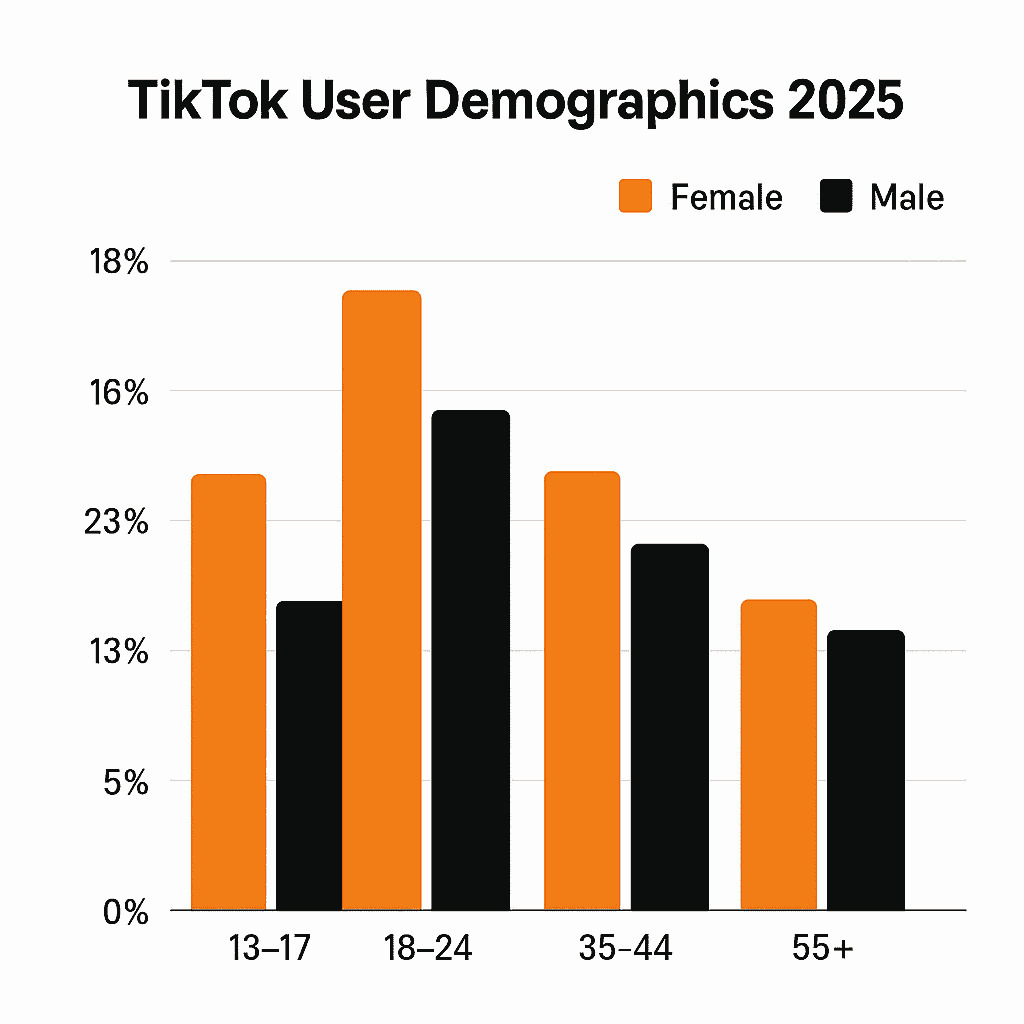
Breakdown of TikTok gender demographics and age group distribution in 2025:

How to Build a TikTok Ads Strategy That Converts

Identify your ideal Gen Z customer

Start by defining your audience’s interests, behavior patterns, and content preferences. TikTok’s audience insights tools help marketers identify what resonates with specific segments. You can explore behavior, demographics, categories, and trends using data from TikTok Ads Manager Insights.

Choose ad formats that match Gen Z expectations

Some formats tend to perform better for younger viewers:

  • In-feed video ads
  • User-generated-style content
  • Short-form, story-based video
  • Spark Ads that amplify creator content

Research notes that content matching TikTok’s native style consistently outperforms traditional, polished ads.

Align creative and messaging to Gen Z values

Gen Z prefers transparency, quick storytelling, and relatable messaging. Keep ads simple, visually strong, and authentic, not corporate.

Build a strong funnel

The post-click experience matters as much as the ad. Pages should load quickly, match the message, and present a clear call to action. If your funnel struggles with UX, relevance, or conversion flow, a team like Impremis can help optimize landing pages and user experience to support better ad performance.

Sample Campaign Strategy for 2025

Campaign StageGoalRecommended FormatWhat to Focus On
AwarenessReach new Gen Z usersIn-feed ads, UGCHook viewers in first 3 seconds
ConsiderationBuild interestTestimonials, demosTrust, social proof, relatability
ConversionDrive sales/sign-upsProduct-focused videosFast-loading landing pages + strong CTA
RetargetingReengage warm usersReview clips, incentivesReminders, urgency, credibility

This progression helps brands move users smoothly from first impression to action.

Common Pitfalls to Avoid

  • Launching campaigns without a clear creative strategy
  • Using overly polished ads that feel like commercials
  • Sending users to slow or irrelevant landing pages
  • Failing to track key metrics like CTR, hook rate, and conversion rate

If these issues show up, the biggest fixes often involve UX, creative adjustments, and tightening your offer, all areas where our team supports clients through full-funnel optimization.

FAQs

What ad budget is realistic when starting TikTok ads to reach Gen Z?

Many brands begin with a daily budget of $20–$50 to gather enough data for proper testing. 

This allows you to experiment with creatives, audiences, and formats without overspending. 

Teams often rely on experts like ours to shape these early campaigns and ensure budgets are structured for meaningful results.

How quickly should TikTok ads hook the viewer?

Ads should capture attention within the first three seconds because most TikTok users decide almost instantly whether to keep watching. 

Fast hooks, strong visuals, and authentic presentation make a big difference. Our performance specialists help brands shape TikTok-native creative that aligns with this behavior.

Why do some TikTok ads get clicks but no conversions?

Often the issue lies not in the ads but in the landing-page experience. Slow load times, mismatched messaging, or unclear offers cause drop-offs. 

Optimizing UX, design, and post-click flow, something our team handles regularly, helps turn TikTok traffic into actual sales.

Ready to Launch a High-Performing TikTok Ads Strategy?

If you need help shaping TikTok creatives, improving conversion flow, or building a scalable Gen Z acquisition system, you can explore our full capabilities at Impremis or reach out directly through the contact page.

Generating B2B leads isn’t about casting a wide net. It’s about targeting the right professionals, decision-makers, and accounts with precision. 

LinkedIn Ads allow marketers to reach people based on job title, industry, company size, and seniority, making it one of the most effective platforms for business-to-business lead generation.

Key takeaways:

  • Understand LinkedIn Ads benchmarks and performance expectations.
  • Use the right campaign formats for each stage of the funnel.
  • Build strong targeting, creatives, and tracking before scaling.
  • Optimize weekly based on conversion quality, not just cost.

Why LinkedIn Ads Work for B2B Lead Generation

LinkedIn is the go-to channel for B2B performance marketers because of its professional user base and granular targeting options. Reports show that nearly 40 percent of B2B marketers choose LinkedIn as their top platform for high-quality leads.

LinkedIn also allows refined audience building based on job title, industry, skills, or company size, which results in cleaner targeting and more qualified prospects.

Cost-per-lead tends to be higher than most platforms, but these leads are often closer to the final decision stage, making the ROI stronger over time.

What Benchmarks Should You Expect

Understanding benchmarks helps set realistic expectations before launching.

MetricTypical Range
CTR for sponsored content0.44% to 0.65%
CPC$5 to $12
CPL for B2B$60 to $150+
Landing page conversion ratesOften 2 to 4 percent

These are starting points, not limits. Strong targeting, better offers, and optimized UX can outperform these averages.

Common LinkedIn Ads KPIs across industries:

IndustryAvg. CTRAvg. CPCAvg. Conversion Rate
SaaS/Tech0.74%$6.455.9%
Financial Services0.58%$7.256.4%
Professional Services0.61%$5.907.2%
Healthcare0.46%$6.854.9%
Education0.63%$4.786.8%

Getting Started: Build the Right Foundation First

A strong setup prevents wasted budget and improves lead quality immediately.

Define goals and map your audience

Start with a clear objective, whether that’s demo signups, content downloads, or webinar registrations. 

Audience mapping matters; job titles, company size, seniority level, and industry all play critical roles. 

Choose the right ad formats

Each format performs differently depending on your goal.

  • Sponsored Content for reach, education, and lead generation
    Single image, carousel, or video ads for awareness
  • Message Ads for direct outreach
  • Lead Gen Forms for higher conversion rates without sending users off-platform
  • Retargeting ads to re-engage warm audiences

LinkedIn’s own ad type guide at LinkedIn Marketing Solutions outlines these use cases clearly.

Strengthen your landing pages and conversion flow

Landing pages must load fast, match the ad’s message, and present a clear offer. If your pages struggle with UX, friction, or drop-off, Impremis can help with optimization, design improvements, and conversion strategy.

LinkedIn Ads Strategy for B2B Lead Generation

Start with small, controlled tests

Begin with a modest daily budget and narrow targeting. Use Sponsored Content or Lead Gen Forms as your initial test formats. Monitor CPC, CTR, and early lead quality to identify your strongest segments.

Use a full-funnel structure

Top-of-funnel: sponsored content, educational posts, video ads
Mid-funnel: retarget website visitors or content engagers
Bottom-of-funnel: Lead Gen Forms, Message Ads, or strong conversion-focused offers

Mixing formats improves reach and helps nurture prospects through each stage of the decision cycle.

Elevate your creative and messaging

Headlines should speak directly to the problem and the outcome. Visuals should be simple, professional, and relevant. Calls-to-action must be direct and clear. Use value-forward messaging that signals expertise.

Review and refine performance weekly

Look beyond clicks. Review:

  • Lead quality
  • Job titles and industries coming in
  • Cost metrics
  • Conversion rates
  • Post-lead sales engagement

If leads aren’t converting, audit targeting, messaging, and landing pages. Impremis specializes in improving these elements to strengthen return on ad spend.

When to Scale Your LinkedIn Campaigns

Scale only when performance signals are stable and positive:

  • CPL aligns with expected customer value
  • Lead quality is consistent
  • Conversion rates remain steady
  • The audience is not fatigued

If CPL rises rapidly or quality declines, pause and reassess your funnel, creative, or UX. Impremis often helps businesses rebuild broken acquisition journeys to drive stronger results.

FAQs

What budget should someone start with for LinkedIn B2B lead generation?

Most advertisers begin with $20–$50 per day to generate enough data for early testing. 

The challenge is knowing how to structure spend and prioritize audiences, which is why many teams lean on experts like our performance strategists to shape a more efficient launch plan.

Which LinkedIn Ads format is most effective for generating qualified B2B leads?

Lead Gen Forms often convert best because they reduce friction, while Sponsored Content or Message Ads can perform well depending on the offer. 

Choosing the right mix can be tricky, so brands often rely on guidance from specialists at our performance marketing team to match formats to buyer intent.

Why are LinkedIn Ads more expensive than other platforms, and why do companies still use them?

LinkedIn ads cost more because they reach decision-makers with higher purchase authority. The issue isn’t usually the cost, it’s when those leads don’t convert due to landing-page friction or funnel gaps. 

That’s where our team helps refine UX, messaging, and conversion flow to make those clicks count.

Ready to Improve Your LinkedIn Ads Performance?

If you want support launching LinkedIn campaigns, optimizing targeting, improving creative, or fixing conversion issues, Impremis can help. 

Explore the full capabilities on the Impremis website or connect directly through the contact page to build high-quality B2B lead-generation systems.

Many e-commerce owners want to run Google Ads but feel overwhelmed by setup, bidding, product feeds, and what to expect from their first campaigns. 

This beginner-friendly guide explains how Google Ads works for online stores, how to structure your campaigns, and how to build a foundation that leads to profitable results.

Key takeaways:

  • Learn the core Google Ads formats used by successful online stores.
  • Understand real performance benchmarks for Search, Shopping, and Performance Max.
    Set up tracking, product feed, and campaign structure the right way.
  • Follow proven steps to optimize, scale, and avoid common mistakes.

Why Google Ads Matters for E-Commerce Growth

Google Ads offers unmatched buying intent. When shoppers search for products, they reveal exactly what they want, allowing online stores to capture demand at the perfect moment.

Reports show that Google Ads helps online stores reach high-intent customers faster than most paid channels. It also gives advertisers complete visibility into performance metrics, enabling them to refine campaigns over time.

What Good Performance Looks Like for Beginners

Beginners often wonder whether their numbers are “normal.” Benchmark studies help set realistic expectations.

  • The average conversion rate for e-commerce Search campaigns is roughly 2.8%
  • General Google Ads conversion rates across industries average around 7.5%
  • Shopping ads convert around 1.9% on average
  • The typical CPA for e-commerce Search generally ranges from $45 to $100, though it can vary widely based on several factors.

If early campaigns land near these ranges, performance is within a normal beginner baseline. Improvement comes from optimization, data, and better product feed quality.

The Foundation: What Every Beginner Must Set Up First

Before spending any budget, get your technical base right. Poor tracking or a weak product feed leads to wasted spend.

Build tracking and measurement

Install GA4, set up conversions, enable enhanced measurement, and connect Google Ads with Analytics. Proper conversion tracking predicts campaign success more than any targeting or bidding setting.

Set up Merchant Center and your product feed

For Shopping campaigns, Google relies directly on your product data, especially accurate titles, clean images, correct pricing, and updated availability. Product feed health impacts visibility and cost.

Strengthen product pages and store UX

Even the best ads fail if the store loads slowly or lacks trust signals. If the store struggles with UX or conversion flow, a team like Impremis can help optimize landing pages and navigation to improve conversion rates before ad spend ramps up.

Choosing the Right Google Ads Campaign Types

Beginners should focus on the core formats that drive predictable returns for online stores.

Search Campaigns

Search ads put your products in front of shoppers actively typing in purchase-ready keywords. They’re essential for beginners because they provide predictable intent and clean data.

Shopping Campaigns

Shopping ads show product images, prices, and titles. Research shows that high-quality images and keyword-rich product titles increase click-through and conversion rates.

Performance Max

Once Search and Shopping produce stable results, add Performance Max. Performance Max works best when product feed quality is high and conversion tracking is fully accurate.

Beginner-Friendly Campaign Structure

Beginners often overspend by mixing too many products and keywords into one campaign. A simple structure works best.

For Search Campaigns

  • One campaign for the core product category
  • Tight ad groups with focused keyword themes
  • Responsive search ads with multiple benefit-driven headlines

For Shopping Campaigns

  • One Shopping campaign to start
  • Segment products by margin or bestsellers later
  • Ensure your feed titles include brand, product type, size, color, or features

For Performance Max

  • Add once you have 30–60 days of conversion history
  • Supply strong creatives and accurate product feed
  • Use audience signals based on past customers or site visitors

If structuring campaigns feels overwhelming, Impremis can support setup and ongoing management through its performance marketing services.

Optimization Tips That Drive ROI

The strongest Google Ads results come from consistent, weekly improvements.

Improve product titles

Keywords in a product title dramatically influence Shopping visibility.

Monitor key metrics

Track metrics such as CTR, CPC, conversion rate, CPA, and ROAS. Compare your results against current industry benchmarks to spot opportunities.

Improve store UX

Slow load times and confusing layouts reduce conversions. Impremis helps brands improve user experience and conversion flow.

Scale slowly

Increase budgets only when performance stays consistent for at least two weeks. Avoid rapid scaling that distorts cost efficiency.

Frequently Asked Questions

What budget should a beginner expect to start with on Google Ads?

Most beginners see meaningful data at $30 to $50 per day across Search and Shopping. 

Smaller budgets often produce slow learning. If budget allocation or structure feels unclear, Impremis can help create a scalable plan and optimize spend for stronger ROI.

How long until a new e-commerce Google Ads campaign becomes profitable?

Most stores need about 30 to 60 days of testing as Google learns what converts. Profitability depends on product pricing, margins, feed accuracy, and store UX. 

Impremis helps brands shorten this ramp-up time by improving conversion paths and ad structure.

Why do Google Ads get clicks but no sales for online stores?

This usually means the product page or checkout process has friction. Examples include unclear value, slow load times, lack of trust badges, or weak descriptions. 

Our team specializes in conversion rate optimization and web design improvements that turn ad traffic into sales.

Ready to Launch High-ROI Google Ads Campaigns?

If you want expert help with campaign setup, product feed optimization, or improving conversion rates, Impremis can support the entire process. 

Explore capabilities on the Impremis website or connect with the team through the contact page to build a profitable e-commerce advertising strategy.

When businesses run ads on Facebook and Instagram, collectively the Meta Ads ecosystem, many hope for big returns. But rising competition and changing user behavior mean it’s no longer enough to just “boost a post.”

To truly maximize Facebook ads ROI (and Instagram ads ROI) in 2026, advertisers must marry smart strategy, sharp creativity, and data-driven optimization.

In this article, you’ll discover:

  • recent performance benchmarks and what “good” performance looks like,
  • platform-specific strengths to exploit,
  • concrete steps to cut costs and boost conversions,
  • and real-world tactics you can use now to improve Meta ads performance.

Key takeaways: define clear goals, design ads for each platform’s strengths, track the right metrics, and optimize constantly.

Understanding the Benchmarks: What “Good” Looks Like in 2025 to 2026

Before optimizing, you need context. These benchmarks help you gauge whether your campaigns are underperforming or ready to scale.

What this means: If your Meta ads deliver ~9–10 percent CVR, sub-$1.50 CPCs, and healthy CTR, performance is aligned with industry standards. Anything below signals the need for optimization.

Why You Must Treat Facebook & Instagram Ads Differently

Even though both platforms run on Meta’s ad system, user behavior and creative expectations make each platform unique.

Facebook: Precision targeting + conversion funnels

  • Facebook performs well for lead generation, longer copy, and deeper-funnel users, according to insights from Unity Connect’s Facebook vs Instagram guide.
  • Custom audiences, behavior-based targeting, and lookalikes help improve accuracy and reduce wasted spend.

Instagram: Visual storytelling + impulse-driven engagement

  • Instagram thrives on video, Reels, Stories, and carousel content that blends into the feed, supported by recommendations from Brandwatch’s Instagram ads best practices.
  • Authentic visuals tend to outperform “polished” ad-style images.

Hence, use Facebook for deeper consideration and conversions. Use Instagram when you need to spark attention, inspire clicks, or drive fast visual engagement.

7 Strategies to Maximize Meta Ads ROI in 2026

1. Define clear campaign objectives

Meta optimizes based on your chosen objective. Changing the objective mid-campaign hurts results. This is backed by the Meta ads setup framework explained by Improvado.

2. Build precise audiences and test lookalikes/retargeting

  • Use custom audiences (site visitors, email lists, high-intent engagers).
  • Build lookalike audiences from top customers.
  • Retarget users who abandoned carts, signup flows, or key pages.

Precise targeting improves conversion rates and reduces CPC.

3. Match creative format to platform

  • Use Reels, Stories, and native-feeling video for Instagram.
  • Use longer, benefit-forward copy and Instant Experience ads on Facebook.
    Industry insights from Unity Connect reinforce this divide.

4. Ensure landing pages convert

Your landing page determines whether the click becomes revenue. Slow load times, mismatched messaging, and confusing UX crush ROI.

If you need help improving post-click conversion, explore Impremis performance marketing capabilities.

5. Monitor the right metrics

Track CTR, CPC, CVR, cost per result, ROAS, bounce rate, time on page, and form completions. Compare performance regularly to the benchmarks above.

6. Use a full-funnel, test-and-scale structure

  • Start with awareness or traffic campaigns.
  • Move engaged users to mid-funnel ads.
  • Retarget warm audiences for conversion.
  • A/B test creative, copy, audiences, and landing pages.

7. Scale budgets slowly

If an ad performs consistently, increase spend gradually. If costs spike, pause and analyze before pushing more budget.

Example Meta Ads ROI Optimization Framework for 2026

  1. Choose objective
  2. Build custom + lookalike audiences
  3. Create platform-specific ad formats
  4. Launch multiple variations
  5. Review data after 3–5 days
  6. Pause poor performers
  7. Retarget engaged users
  8. Improve landing pages and UX
  9. Re-test every 2–4 weeks

Frequently Asked Questions

Q: How soon should I expect ROI from Meta ads?

It depends on your funnel and offer. Some see results within days, others need several weeks of testing. Impremis builds fully optimized funnel experiences that speed up ROI by improving the journey from ad click to final conversion.

Q: Why are my Meta ads getting clicks but not conversions?

This typically points to issues with your landing page: poor UX, slow loading, mismatched messaging, or unclear steps. Impremis fixes these friction points through UX design, development, and conversion-rate optimization.

Q: Should I run Facebook and Instagram ads together?

Often yes, because both platforms serve different roles. Facebook is stronger for conversions and lead generation. Instagram excels at visual engagement and top-of-funnel awareness. Impremis can help you build an integrated Meta ads strategy across both.

Ready to Turn Clicks Into Conversions?

If you want to boost Meta ads performance, increase conversion rates, or upgrade your landing page UX, Impremis can help. Explore full-service capabilities at Impremis or contact here to build a high-ROI Meta ads strategy.

Website redesigns can drag on forever, delays, unclear feedback, endless revisions. Smart prototyping flips the script. Teams get to build early versions, test ideas fast, and tweak things before sinking time into full development. It’s a huge time-saver and gets a better marketing site live, faster.

With the right UX prototyping tools, marketers can actually see layouts and user flows, no more waiting for a finished product to get a feel. Prototypes show off interactive features, so everyone’s on the same page. That means quicker decisions and less of the back-and-forth that usually drags website projects out.

When marketers lean into smart prototyping, they can test early, spot issues, and focus on what matters most. This keeps projects moving and makes for a way better user experience. Learning how to work prototyping into a redesign isn’t just smart, it saves money and gives everyone more confidence in the end result.

Key Takeaways

  • Early prototypes mean faster feedback and quicker redesigns.
  • Visual tools help marketing and design teams work together better.
  • Focusing on user needs in prototypes leads to stronger websites.

Smart Prototyping: Transforming the Website Redesign Process

Smart prototyping makes website redesigns way less painful. Teams can quickly build, test, and tweak ideas before jumping into full development. It brings order to messy projects and helps everyone avoid expensive mistakes.

How Website Prototyping Accelerates Marketing Website Redesigns

Prototyping lets you see early, hands-on versions of a new site. Marketers and designers can sketch out wireframes or build interactive mockups, no code needed. This makes it easier to spot usability problems and messaging gaps right up front.

Testing these prototypes with users or stakeholders brings fast feedback. That means fewer last-minute fire drills and less wasted money. Tools like Figma or InVision make updates in real time, so prototyping really does speed up marketing website redesigns.

Key Benefits of Prototyping for Website Redesign Efforts

Prototyping brings a bunch of benefits for website redesigns:

  • Early Testing: Catch navigation and usability issues before the real build.
  • Clear Communication: Visual models get everyone, marketers, designers, developers, on the same page.
  • Reduced Costs: Find flaws sooner so you don’t pay for them later.
  • Faster Approvals: Stakeholders see working samples, not just flat images.
  • Better User Experience: Real feedback shapes designs that actually work for users.

The Role of UX Prototyping in Modern Redesign Workflows

UX prototyping puts the user’s journey front and center. Teams can simulate how people click around, test navigation, and see if content makes sense. This way, marketing sites aren’t just pretty, they’re actually usable and meet what visitors expect.

These tools make it easy to test and tweak user flows. Teams start with basic wireframes, then move to more detailed, interactive versions as the project moves along. This keeps usability testing focused and cuts down on guesswork.

Collaboration Between Marketers, Designers, and Developers

Smart prototyping really brings marketers, designers, and developers together. Interactive prototypes turn fuzzy ideas into something you can actually see and click, making goals much clearer.

Marketers jump in early with content and business needs. Designers shape those into layouts. Developers give feedback on what’s possible and help avoid tech headaches. This kind of collaboration means fewer surprises and features don’t get missed.

When teams use shared prototyping tools, everyone can comment and make changes as they go. It keeps things transparent and smooths the handoff to development. The result? Less waiting around and a better-performing site in the end.

Essential Prototyping Tools and Methods for Redesign Success

Picking the right prototyping tools and methods can make or break a website redesign. Using both low- and high-fidelity prototypes, along with solid UX prototyping tools, helps teams move faster. Mixing rapid prototyping with ongoing testing keeps websites user-focused and saves both time and cash.

Low-Fidelity vs High-Fidelity Prototyping

Low-fidelity prototypes are basically sketches or wireframes. They nail down layout and page flow, skipping the fancy graphics and interaction. Teams can change these fast and get early feedback on structure and usability, no big investment needed.

High-fidelity prototypes are the opposite; they look polished, with real colors, images, and clickable stuff. These are great for testing user actions and final design details before building anything for real.

Most teams start simple, then ramp up the detail. This step-by-step approach keeps things moving and avoids expensive do-overs late in the game.

Top UX Prototyping Tools for Marketers and Designers

There are a bunch of great UX prototyping tools out there, and they make redesigns way easier:

  • Figma lets teams work together live in the cloud, with interactive prototypes and reusable design systems that speed things up.
  • Adobe XD is popular for sharing and building both wireframes and high-fidelity prototypes. It’s got plenty of features for UI/UX design.
  • InVision is all about quick, clickable prototypes, perfect for getting early feedback.
  • Webflow goes a step further, letting you design and develop at the same time. You can even publish prototypes live, so handoff is almost instant.

These tools offer version control, commenting, and connect with project management apps. The best fit depends on your team and how much detail you need.

Integrating Rapid Prototyping and Iterative Testing

Rapid prototyping lets teams build quick versions and test them over and over. This cycle, make, test, fix, helps marketers find problems early and keep designs user-friendly.

Testing interactive prototypes catches layout issues, missing features, or confusing menus before launch. Tools that mimic real clicks and scrolls make the whole thing feel real for testers.

Each round of testing leads to smaller, manageable updates. This keeps redesigns moving and builds confidence before the real development starts.

Best Practices for Usable and Functional Website Prototypes

The best prototypes balance looks and function. Start with wireframes that show clear navigation and content spots, don’t get distracted by colors or fancy fonts right away.

Clickable elements like buttons and forms are a must. They let you test if real users can actually get things done on the site.

Set time limits for each prototype version. Don’t chase perfection, reuse design components to save time and keep things consistent.

When you collect feedback, keep it focused and clear. Built-in collaboration tools help everyone stay in sync and speed up the redesign.

Want to dig deeper? Check out more UX prototyping tools for better collaboration and smoother redesigns.

Frequently Asked Questions

Smart prototyping lets teams test ideas fast and polish the important stuff early. It cuts delays, saves money, and helps marketers and designers actually work together. With the right tools, website redesigns run more smoothly and align better with business goals.

What are the major advantages of using smart prototyping in the website redesign process for marketers?

Smart prototyping shortens timelines, removes confusion, and uncovers issues early, long before costly development begins. 

Many teams rely on Impremis to build clickable prototypes that align everyone on layout, content flow, and UX before anything goes into production.

How does prototyping contribute to the user experience (UX) during a website overhaul?

Prototyping reveals UX issues early, helping teams fix navigation gaps, confusing layouts, and broken flows before launch. 

A strong user experience boosts engagement and conversions, which is why brands often turn to us for UX-led redesigns that put the visitor first from day one.

What are the best tools available for UX prototyping when planning a website redesign?

Figma, Adobe XD, InVision, and Webflow all help teams build interactive prototypes quickly. These tools make collaboration simpler and bring ideas to life much sooner. 

If you’re unsure where to start or need help selecting the right workflow, you can reach out to Impremis for expert prototyping and redesign support.

The Faster Way To Accelerate Your Website Redesign

If you want smoother redesigns, faster approvals, and a website that’s built around real user needs, smart prototyping is the way forward. The team at Impremis can help you streamline your entire redesign workflow with better UX planning, interactive prototypes, and development-ready designs that cut months off traditional timelines.

Whether you’re planning a full rebuild or optimizing an existing site, you can connect with our web design experts for tailored guidance. A smarter redesign process means fewer delays, and a high-performing site that launches faster and converts better.

Building landing pages that actually convert leads is a must if you want to grow your business online. A good landing page sticks to one goal and guides visitors to act, sign up, buy, download, whatever you need. 

If you want steady lead generation, you need a design that’s clear, trustworthy, and has strong calls to action.

Great landing pages use simple copy and clean layouts that don’t distract people. Social proof, mobile optimization, and fast load times help keep visitors interested. You’ve got to test and tweak things regularly if you want your page to work for everyone.

If you align your page content with what users actually want, you’ll see better conversion rates. Stick to what works and you’ll get more than just visitors, you’ll get real leads.

Key Takeways

  • Clear, focused messaging makes people act.
  • Trust signals and mobile-friendly design keep visitors engaged.
  • Keep testing and match user intent to boost conversions.

Key Elements of Landing Pages That Consistently Convert

Strong landing pages have clear goals, grab attention fast, and build trust so people want to take action. They walk visitors through what to do, step by step, without anything getting in the way. Make forms quick and easy, and use trust signals to show people they’re making a smart choice.

Defining Your Landing Page Goal and Audience

Start by picking one clear goal for your landing page. Maybe you want emails, free trial signups, or direct purchases. Every single thing on the page should push that goal, don’t let anything distract from it.

Know your audience. Figure out what they need, what bugs them, and what they like. If you’re targeting small business owners, you’ll use different words and offers than if you’re talking to students.

When your content matches what your users want, conversions go up. Your design and CTAs should always point people straight to that goal.

Crafting Compelling Headlines and Subheadlines

Your headline is the first thing people see. Make it short, direct, and focused on the main benefit. Something like “Get 30 Days Free – No Credit Card Required” grabs attention and gets people interested.

Subheadlines back up your headline with extra details or reassurance. They help explain why your offer matters. Both should speak directly to your reader and make your selling point obvious.

Action words and a little emotion help keep people reading. Don’t use jargon. Keep it simple and put these lines front and center so nobody misses them.

Building Trust With Social Proof and Trust Signals

Trust is everything. Add testimonials, customer logos, and star ratings to show real people like your offer. Actual quotes with names and photos make it believable.

Trust badges, security certificates, money-back guarantees, awards, all help people feel safe. Show off any press mentions too. Put these next to your form or CTA to give people that last push they need.

Keep the design clean so these trust signals stand out, not get lost in clutter.

Optimizing Forms for Seamless Lead Capture

Your form is where you catch leads, so it should be quick and painless. The fewer fields, the better, usually just name and email is enough at first.

Use clear labels and make sure fields are big enough for phones and tablets. Autofill is a nice touch to speed things up even more.

Make your submit button pop with a clear action, like “Get My Free Guide” or “Start Your Trial”. Put your form above the fold, and on longer pages, repeat your CTA so people always know where to click.

Try out different form styles and lengths to see what your audience likes best.

Landing Page Design and Optimization Best Practices

The best landing pages are clear, fast, and built for user engagement. Every detail, from layout to where you put your CTA, matters if you want people to convert. Optimization isn’t a one-time thing; you’ve got to keep working at it.

Creating a Clean and Distraction-Free Layout

Keep your design clean. Cut out anything that doesn’t help your offer. Fewer distractions mean people focus on what you want them to do.

Use white space to break up sections and make the page easy to scan. Add high-quality images or video if it helps your message, but don’t let visuals take over. Show the value of your offer, downloadable resource, free trial, demo, whatever it is.

Don’t clutter your page with too much text, pop-ups, or a bunch of CTAs. Short, simple forms work best. Only ask for what you really need. This layout makes it easy for users to spot your CTA and act.

Strategic Placement of CTAs and Above-the-Fold Content

Make your CTAs bold and easy to find. Put your main CTA above the fold so visitors see it right away. Use button copy that’s specific, like “Get your free trial” or “Download the guide.”

Above-the-fold content should quickly explain your offer. Use a clear headline, a short supporting line, and maybe a testimonial or trust badge. Bullet points help highlight benefits fast.

If you want, add a secondary CTA lower on the page for people who read more. But don’t overdo it, one or two CTAs is enough. Too many just confuse people.

Enhancing User Experience With Fast Load Times and Mobile Optimization

If your page loads slow, people leave. Speed really matters. Compress images and trim down your code to make things faster.

Design for mobile from the start. Tons of visitors use their phones, so your page needs to look good and work well on small screens. Use big buttons, readable fonts, and simple navigation.

Google loves fast, mobile-friendly pages, so you’ll get more search traffic too. Speed and usability go hand-in-hand for landing pages that generate leads.

Continuous Testing and Data-Driven Improvements

No landing page is perfect right out of the gate. Run A/B tests on headlines, CTAs, images, and layouts to see what actually works. Tools like Hotjar and heatmaps show you how people use your page.

Watch your bounce rate, time on page, and conversion rates. If people leave fast, you might need a clearer offer or better visuals.

Keep checking your data and update your page regularly. That’s how you get a landing page that fits your marketing campaigns and actually converts. For more ideas, check out these landing page best practices.

Frequently Asked Questions

Strong landing pages have clear messages, simple navigation, and fast performance. They use solid CTAs and smart design to guide visitors to act, without distractions.

What are the essential elements of a high-converting landing page?

A strong landing page has a clear headline, benefit-driven copy, and CTAs that stand out. Trust signals like reviews and security badges help visitors feel confident before submitting their info. If you’re unsure where to start, this team can help you build pages designed for higher conversions.

How do you design a landing page that effectively captures lead information?

Short, simple forms almost always convert better. Ask for the minimum information you need and make sure everything works smoothly on mobile. Many brands rely on Impremis to build landing pages with clean UX, fast performance, and friction-free forms that increase lead volume.

What are the best practices for optimizing landing page performance?

Fast load times, mobile-friendly layouts, and strong message-match between ads and landing pages are key. Continuous A/B testing also helps you find what truly resonates. If you want expert help refining performance, you can reach out to us for a data-driven optimization strategy tailored to your goals.

Strengthen Your Landing Pages With Expert Conversion Support

If you want landing pages that generate leads consistently, the right design and optimization process makes all the difference. The team at Impremis can help you refine your messaging, improve your layouts, and build mobile-ready pages that convert at a much higher rate.

Whether you’re looking to overhaul a funnel or simply boost performance on your top campaigns, you can connect with our landing page specialists for tailored guidance. Better design leads to better conversions, and your best results start with a stronger landing page experience.

Paid media campaigns really depend on solid user experiences, and responsive web design is a huge part of that. When your ads send folks to a website that just works, no matter what device they’re on, they’re way more likely to stick around and actually convert. 

A responsive website gives your paid media a real shot at success across all screen sizes, especially mobile, where most of your traffic probably comes from these days.

Mobile responsive ads and optimized landing pages cut bounce rates and speed up load times. That helps your ad quality scores and ROI. If your site isn’t responsive, you’re just throwing away potential customers who get frustrated with slow or clunky pages on their phones.

Brands that nail responsive design get smoother branding and reach more people. You don’t have to pay for a bunch of different site versions, either. It’s just a smarter, more efficient way to keep up with how people actually browse.

Key Takeaways

  • Responsive design boosts ad engagement by working on all devices.
  • Mobile-optimized ads lower bounce rates and lift conversions.
  • Consistent, scalable design helps paid media keep winning long-term.

The Critical Role of Responsive Web Design in Paid Media Results

Responsive web design shapes how your paid media campaigns perform. When your site works smoothly on mobile, loads fast, and connects ads to landing pages without a hitch, you’re set up for more conversions. All these little details add up and make a big difference in your results.

How Responsive Web Design Boosts Paid Media Performance

Responsive web design means your site looks good and works well on any screen, especially phones, which now get most of the clicks anyway. When landing pages adjust on the fly, people get faster load times and easier navigation. That keeps them from bouncing and helps them move down the funnel.

Better mobile usability just makes people happier, and happy visitors are more likely to do what you want, like fill out a form or buy something. Responsive sites also help with core web vitals, so you get better page rankings and ad quality scores. That can mean lower ad costs and more eyeballs on your ads. It’s a win-win for your ad spend and conversion rates.

Mobile Optimization for Paid Ads and Landing Pages

Mobile optimization isn’t just about shrinking stuff down. It’s about making sure ads and landing pages load super fast and look right, without weird errors. Slow or buggy mobile pages are a surefire way to lose people.

Google cares a lot about page speed for ad rankings. If your landing page is slow, people bail before you even get a chance. Mobile-friendly designs that keep images and scripts light help you win those precious seconds and keep users moving from ad to page without friction.

A solid mobile landing page keeps things simple and makes actions, like buying or signing up, easy. Less hassle means more conversions. That’s why mobile optimization is just non-negotiable for paid media.

Responsive Design Strategies for Mobile-First Campaigns

Mobile-first design puts mobile users right at the center. It’s about keeping things simple, clear, and quick to find, even on a tiny screen. That’s where your audience is anyway.

Good strategies use flexible grids, scalable images, and content that adapts to whatever device people have. Testing on lots of devices helps you spot problems before launch. If mobile usability feels seamless, people move through your conversion funnel without getting stuck.

When you focus on mobile users first, you get more engagement and better conversion rates. Responsive design that follows mobile-first thinking helps your paid media campaigns deliver better returns because everything just works, no matter where people find you.

Want to dig deeper? Check out The Importance of Responsive Web Design in 2025.

Key Benefits and Best Practices of Responsive Web Design for Paid Media

Responsive web design helps your paid media work by making sure ads and landing pages don’t break on any device. You get lower bounce rates, faster load speeds, and a boost for your SEO. Developers use flexible layouts and smart tools to keep sites easy to update and ready for the future.

Improved User Experience Across Devices

Responsive design uses fluid grid layouts and flexible images that automatically fit any screen. No more awkward scrolling or weird navigation. Mobile users especially love big, easy-to-tap buttons and simple menus. That’s what gets them interacting with your ads and landing pages.

Fast-loading pages keep people from bouncing, which is huge for paid campaigns. When visitors stick around and click more, you see better conversion rates. CSS media queries help content rearrange for different screens, so everyone gets a good experience no matter what device they’re on.

SEO and Mobile-First Indexing Advantages

Search engines love mobile-optimized sites, and mobile-first indexing is the new normal. Responsive websites that load fast, look right, and keep content consistent dodge penalties for duplicate content and bad usability. That means better SEO rankings and more organic traffic, so you don’t have to rely only on paid ads.

Performance tricks like caching and compressing images also help with faster load times (and Google notices). Running just one responsive site saves time and money compared to juggling separate desktop and mobile versions. Plus, it helps your search rankings and ad quality scores.

Tools and Frameworks to Build Responsive Sites

Frameworks like Bootstrap, Foundation, and Tailwind CSS make it easier to build responsive layouts. You get pre-made components, so you spend less time coding and more time making sure your site works everywhere.

Testing tools like BrowserStack, Responsinator, and Google Mobile-Friendly Test let you see how your site looks on different devices. Catching issues early means your ads and content won’t flop. Keep an eye on things with analytics, too, so you know performance stays solid.

Mixing these tools with best practices, like CSS media queries and smart image optimization, gets you responsive sites that load fast, keep users happy, and make your paid media campaigns work harder for you.

Frequently Asked Questions

Responsive web design makes your ads look and work better across all devices, especially phones and tablets. It helps your website adapt to any screen size, so ads are easier to see and click. That flexibility leads to better engagement and, hopefully, more conversions.

How does responsive web design enhance the user experience for mobile ad viewers?

Responsive design ensures every ad click leads to a page that loads correctly and feels natural to use. Touch-friendly navigation, scalable images, and readable layouts all reduce bounce rates. 

If you need help identifying mobile UX issues, our team can review your site and recommend improvements that directly support your paid media results.

What are the advantages of using responsive design in improving conversion rates from paid media campaigns?

When mobile visitors land on pages that fit instantly, they’re far more likely to complete the action your ad promised. A single, responsive site strengthens SEO, lifts ad quality scores, and builds trust through consistent design. 

Many brands partner with Impremis to fine-tune responsive layouts that increase form fills, sales, and overall campaign efficiency.

In what ways does mobile optimization of ads affect click-through and engagement rates?

Mobile-optimized ads load quickly and look clean on any device, which helps users understand your message without extra friction. Clear layouts and fast responses drive higher engagement and stronger CTRs. 

If improving mobile performance feels overwhelming, you can always reach out for expert support in aligning ad creative and landing pages.

Improve Your Responsive Experience to Boost Paid Media Results

A responsive, mobile-ready website makes every ad perform better. If you’re ready to tighten load times, fix mobile friction, or refine your landing pages for higher ROI, the team at Impremis can help you build a smoother experience that strengthens your paid media performance.

Whether you need a full responsive redesign or targeted updates to improve engagement, you can connect with our web experts for guidance built around your goals. 

Better responsiveness means better conversions, and it starts with the right support.

Shopping cart0
There are no products in the cart!
0